Skip all navigation and jump to content Jump to site navigation Jump to section navigation.
NASA Logo - Goddard Space Flight Center + Visit NASA.gov region to select the NASA home page region to select the NASA GSFC home page
AEROSOL OPTICAL DEPTH AEROSOL INVERSIONS SOLAR FLUX OCEAN COLOR Maritime Aerosol Network
For receiving updates on AERONET - subscribe to the mailing list by sending an email to aeronet-join@lists.nasa.gov
Aerosol Robotic Network (AERONET)
region to select NASA home page region to select NASA GSFC home page

 +Home


Home
AEROSOL/FLUX NETWORKS
CAMPAIGNS
COLLABORATORS
DATA
LOGISTICS
NASA PROJECTS
OPERATIONS
PUBLICATIONS
SITE INFORMATION
STAFF
SYSTEM DESCRIPTION
 
AERONET DATA ACCESS
 
AERONET ALL Site Lists (V3)

+ Text Format

+ Extended Text Format

+ Google Earth Format

+ All Lists

AERONET Active Site Lists (V3)

+ Text Format

+ Google Earth Format

AERONET Instrument Troubleshooting Interface - Solutions for SENSOR HEAD CABLE COMMUNICATION ERRORS Flag

Condition(s)
Flag if >35; or >5 any day during week

How To Check/Test
Model 4: VIEW > BAT > red button (twice)
Model 5: VIEW > InsH
Model T: MEASURES

Solution Level 1 (< 5 minutes)
Typically, errors will not occur if you can successfully read out the temperature.
1. Check/reseat the the connector panel and both ends of the sensor head cable.
2. Ensure that adequate 12 V power is being supplied to the instrument.
Sensor cable errors in conjunction with robot errors often indicates a problem with connections or 12V power.

Solution Level 2 (more involved)
Model 4 and 5:
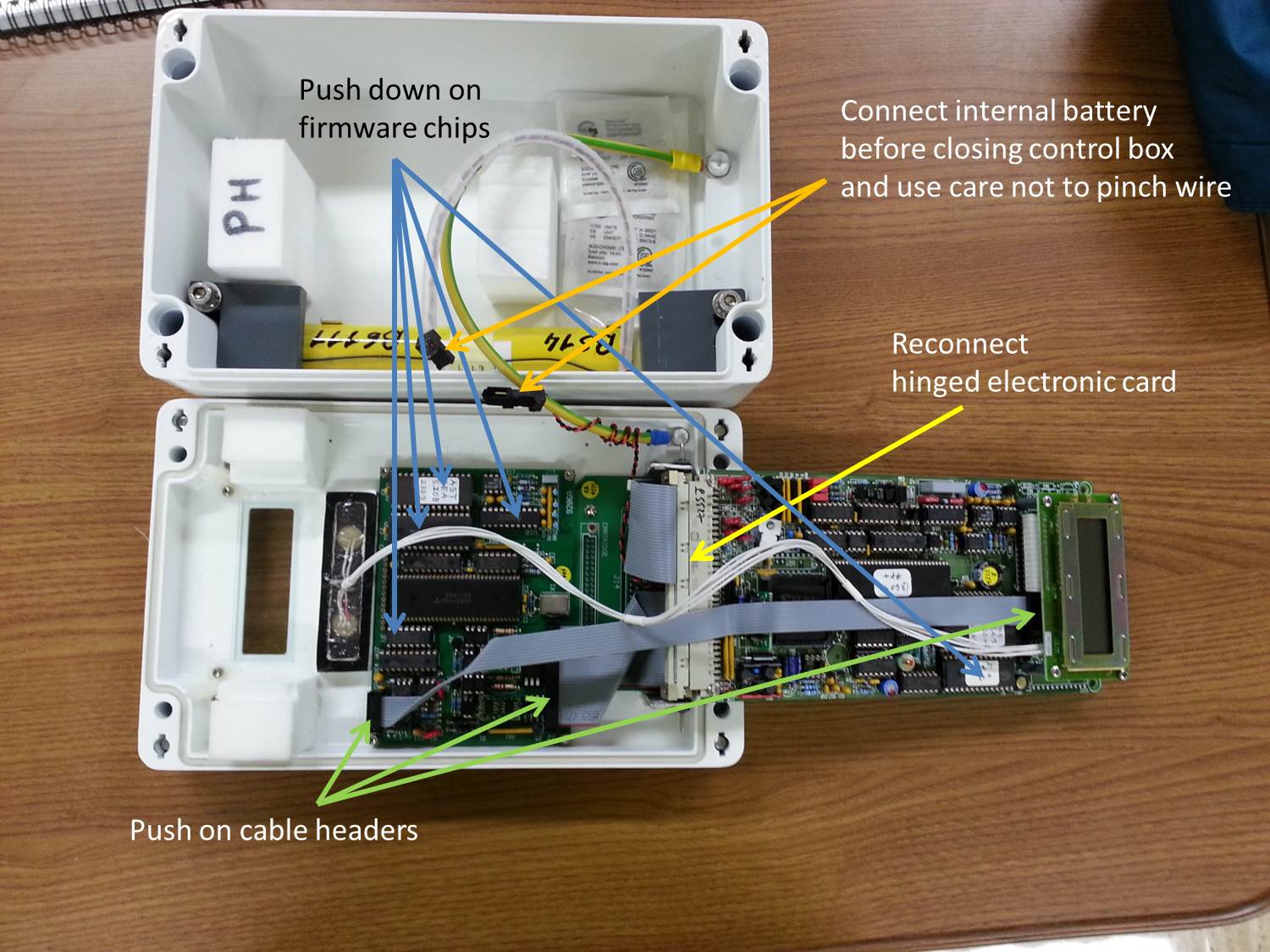
1. Check/reseat internal connections. See Internal check control box.jpg
2. Try a different cable and connector panel (if available).

Model T:
1. Try a different cable and connector panel (if available).

Solution Level 3 (last resort)
1. Return instrument for maintenance.

Control box internal connections
  + Privacy Policy and Important Notices NASA Curator: Petar Grigorov
NASA Official: Pawan Gupta
Last Updated: April 17, 2026